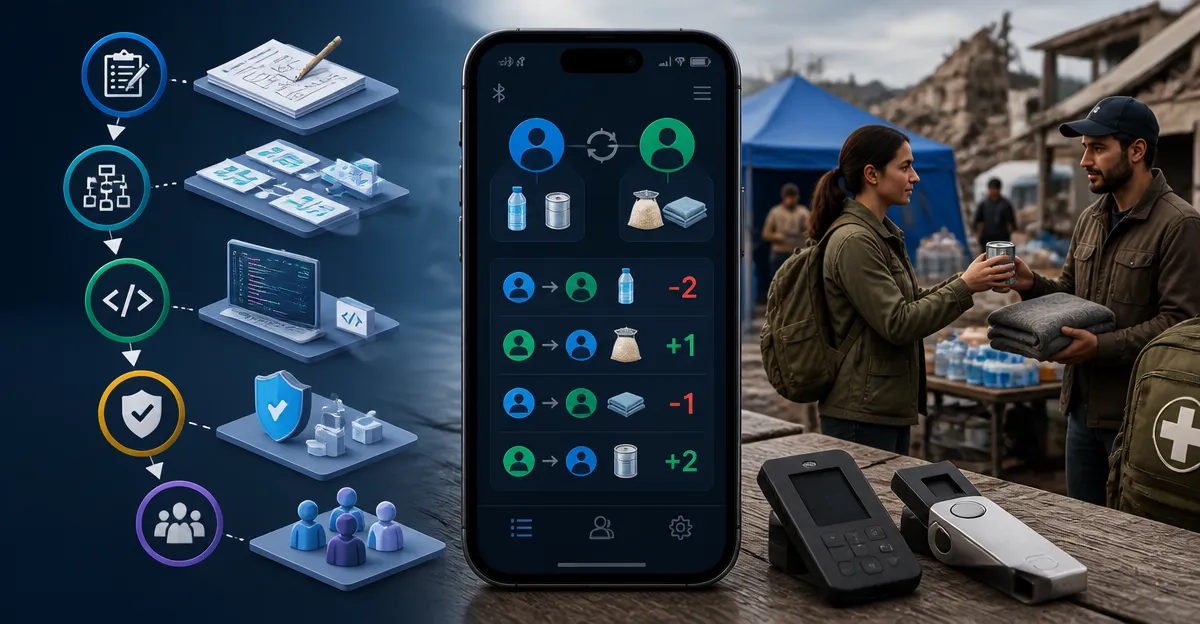
How to Create a Barter Ledger App for Disaster Trading: A Step-by-Step Guide to Building a Secure, Offline-First P2P Exchange
Introduction
In times of crisis, traditional financial infrastructure may become unreliable, making peer‑to‑peer barter exchanges essential for community resilience. This guide teaches the reader how to design and implement a barter ledger application that operates without constant internet connectivity, while protecting digital assets with industry‑leading hardware wallets. The reader will learn to define requirements, set up a secure development environment, integrate offline‑first data stores, and connect hardware signers for transaction authentication. By the end of the guide, one will possess a functional prototype ready for field testing and deployment.
What You'll Need
- Development computer (Windows, macOS, or Linux) with USB‑C ports.
- Secure hardware wallet for private‑key storage – recommended options are listed in the guide.
- Node.js and a modern JavaScript framework (e.g., React, Vue, or Svelte).
- Local database solution such as IndexedDB or SQLite for offline storage.
- Testing devices (smartphones or tablets) for peer‑to‑peer synchronization.
Step 1: Define Functional and Security Requirements
Begin by documenting the core features of the barter ledger: user registration, item catalog, offer creation, trade matching, and audit logging. Security requirements must include private‑key isolation, tamper‑evident transaction signatures, and encrypted backup of recovery phrases. Selecting a hardware wallet at this stage ensures that cryptographic operations never leave a trusted execution environment. The Ledger Nano S Plus Gold provides a compact USB‑C signer with a certified Secure Element (CC EAL 6+), making it ideal for developers who need a reliable, offline key vault. It costs $59.00, carries a 4.5‑star rating from 4,421 reviews, and includes a 1.1" display for transaction verification.
Step 2: Set Up the Development Environment
Install Node.js (version 18 or later) and your chosen framework. Create a new project directory and initialize a Git repository to track changes. Configure ESLint and Prettier to enforce consistent code style, which aids collaboration during disaster response scenarios where multiple volunteers may contribute. Connect the Ledger Nano S Plus Gold to the computer via the included USB‑C cable; the device will appear as a HID (Human Interface Device) that Ledger Live can recognize. Install the Ledger Live desktop application and the Ledger Wallet SDK to enable programmatic signing of transactions from within your code.
Step 3: Implement an Offline‑First Data Layer
Choose IndexedDB for web‑based clients or SQLite for native mobile apps. Structure the database with tables for users, items, offers, and completed trades. Use a service worker to intercept network requests and serve cached data when connectivity is absent. Synchronization logic should employ conflict‑free replicated data types (CRDTs) to merge divergent ledgers once peers reconnect. This architecture ensures that barter operations continue uninterrupted during power outages or network blackouts.
Step 4: Integrate Hardware Wallet for Transaction Signing
When a user initiates a trade, the application must generate a deterministic hash of the trade details and request a signature from the hardware wallet. The Ledger Nano S Plus Pink offers the same secure element as the gold model but adds a vibrant color option for users who prefer visual differentiation. Priced at $59.00 with a 4.5‑star rating, it also supports passwordless two‑factor authentication for online accounts, which can be repurposed to protect the barter app’s admin console. Connect the pink device via USB‑C, invoke the Ledger SDK’s signTransaction method, and display the resulting signature on the device’s screen for user confirmation.
Step 5: Test Transaction Flow on a Large Touchscreen Device
During testing, a larger display simplifies verification of multi‑step signatures. The Ledger Flex features a 2.8" Gorilla Glass touchscreen, Bluetooth connectivity, and NFC, allowing wireless signing without a cable. Although priced at $249.00, its high‑resolution screen reduces the risk of mis‑tapping the confirmation button, which is crucial when confirming complex barter contracts. Its 4.5‑star rating from 448 reviews confirms reliability in real‑world scenarios. Pair the Flex with the Ledger Wallet app via Bluetooth, execute a test trade, and verify that the signed payload matches the local hash stored in IndexedDB.
Step 6: Deploy to Multiple Users with Family‑Pack Devices
In disaster‑prone communities, it is practical to distribute multiple wallets to family members or relief volunteers. The Ledger Nano X Family Pack includes three Bluetooth‑enabled signers for $267.00, each receiving a 4.2‑star rating from 26 reviews. This pack enables separate devices for holding, trading, and backup, mirroring the multi‑signer approach used in traditional escrow services. Bluetooth eliminates the need for cables in the field, and the extended battery life (approximately 8 hours) supports prolonged operation during power shortages. Configure each device with a unique recovery phrase, store the phrases in separate secure locations, and synchronize them via the Ledger Sync feature to maintain a unified ledger across all participants.
Step 7: Establish Backup and Recovery Procedures
Even with offline‑first design, loss of a hardware wallet can jeopardize the entire barter network. The Ledger Nano X & Nano S Plus Pack provides a hybrid solution at $142.00, combining a Bluetooth‑enabled Nano X with a cable‑only Nano S Plus for $142.00 total, rated 4.2 stars from 34 reviews. Use the Nano X for daily transactions and the Nano S Plus as a cold backup that remains disconnected except during scheduled recovery drills. Record the 24‑word recovery seed on the supplied recovery sheets, store them in geographically separated safe locations, and test restoration quarterly to ensure continuity.
Tips & Pro Tips
- Always verify the authenticity of a Ledger device using the Genuine Check feature within the Ledger Wallet app before initializing it.
- When operating in low‑light conditions, enable the device’s backlight (available on Nano X and Flex) to avoid misreading transaction details.
- Consider encrypting the offline database with a passphrase derived from the hardware wallet’s PIN to add an additional layer of protection.
- Use versioned API endpoints for synchronization so that older clients can still communicate with newer server releases during incremental updates.
Troubleshooting
Device not recognized: Ensure that the USB‑C cable is fully inserted and that the operating system has the latest HID drivers. Restart Ledger Live and re‑plug the device.
Signature mismatch: Confirm that the hash algorithm (SHA‑256) used in the app matches the one employed by the Ledger SDK. Re‑generate the hash and retry signing.
Bluetooth connectivity drops: Keep the Ledger Nano X or Flex within a 10‑meter radius of the client device and avoid interference from other wireless peripherals.
Conclusion
Building a barter ledger app for disaster trading demands a blend of robust offline architecture and tamper‑proof key management. By following the seven steps outlined above, the reader can deliver a secure, peer‑to‑peer exchange that remains functional when conventional financial systems fail. The recommended Ledger hardware wallets provide graded levels of portability, screen size, and connectivity, ensuring that every deployment scenario—from individual field agents to family‑wide networks—has an appropriate tool. Continuous testing, regular backup drills, and community education will further strengthen the resilience of the barter ecosystem.
Products Mentioned in This Guide
Frequently Asked Questions
What is an offline‑first barter ledger app and why is it useful during disasters?
It is a peer‑to‑peer exchange platform that stores transaction data locally and syncs when possible, ensuring trade can continue even without internet connectivity.
Which hardware wallets are recommended for securing private keys in a barter ledger?
Popular choices include Ledger Nano X, Trezor Model T, and Coldcard, all of which support secure signing via USB‑C.
How do I store transaction data locally in a web‑based barter ledger?
Use IndexedDB for browser‑based apps or SQLite for desktop/electron builds to maintain an offline‑first database.
Can I build the ledger with any JavaScript framework?
Yes, React, Vue, or Svelte work equally well; choose the one you’re most comfortable with for the UI layer.
What steps are needed to sign a trade transaction with a hardware wallet?
Connect the wallet via USB‑C, invoke its signing API from your app, and submit the signed payload to the peer’s device for verification.