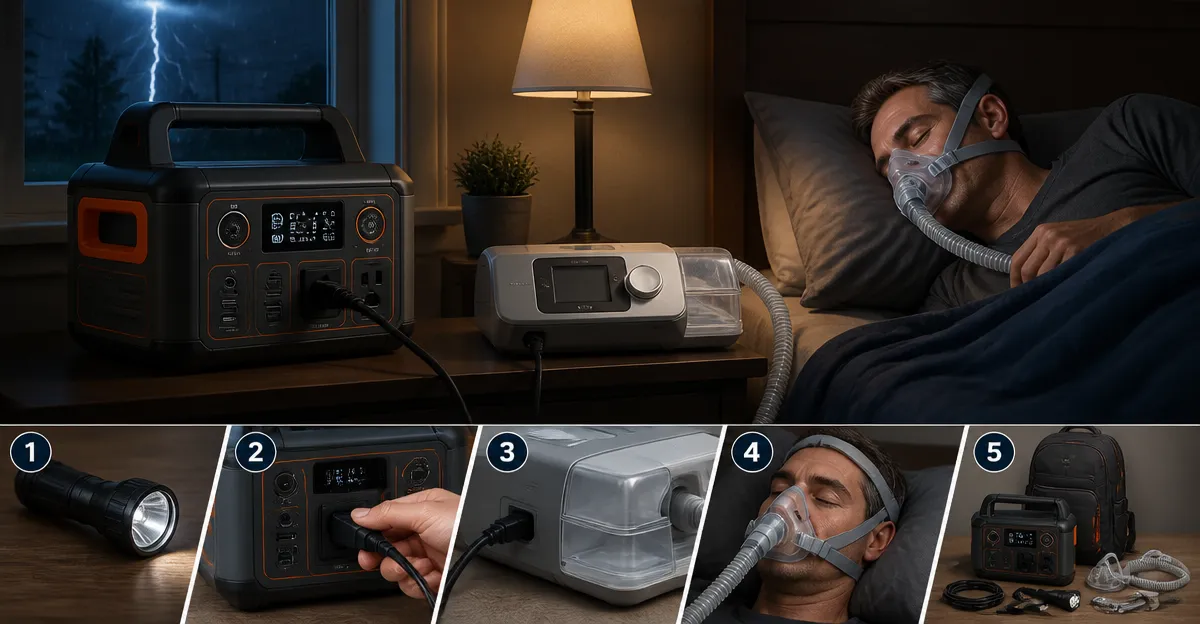
Introduction
Sleep apnea patients rely on continuous positive airway pressure (CPAP) therapy to maintain healthy breathing patterns throughout the night. Power interruptions can jeopardize therapy effectiveness, leading to fragmented sleep and health complications. This guide explains how to prepare a reliable backup power solution that ensures uninterrupted CPAP operation during emergencies. Readers will gain practical knowledge, actionable steps, and confidence to protect their health when the grid fails.
What You’ll Need
- A portable power station capable of delivering at least 100 W continuous power, such as the DARAN Portable Power Station.
- Your CPAP machine and its power adapter.
- Appropriate charging cables (USB‑C or AC plug) compatible with the power station.
- Optional: Solar panel for off‑grid recharging, extension cords, and a surge protector.
Step 1: Determine Your CPAP Power Requirements
Locate the power specifications on the CPAP’s label or user manual; most modern units consume between 30 W and 80 W during operation. Record the maximum wattage and the voltage to ensure the backup source can sustain continuous load without overheating. Multiply the wattage by the expected nightly usage (typically eight hours) to calculate the required energy in watt‑hours. For example, a 60 W CPAP used for eight hours needs 480 Wh, which exceeds the 89.6 Wh capacity of a single charge but can be managed with strategic power budgeting.
Step 2: Select an Appropriate Backup Power Source
The DARAN Portable Power Station offers an 89.6 Wh LiFePO4 battery, 100 W continuous output, and multiple charging ports, making it a versatile choice for CPAP backup. Its ultra‑light design (2.54 lb) and compact dimensions (6.5×3.3×4 in) allow placement beside the bedside without clutter. The built‑in battery chemistry tolerates over 3,500 charge cycles while retaining more than 80 % capacity, providing long‑term reliability for seasonal emergencies. Additionally, the fast‑charging capability (0‑80 % in 1.5 hours) minimizes downtime after a power outage.
Step 3: Prepare the Power Station for Use
Before the first deployment, fully charge the power station using the AC wall outlet; this establishes a baseline capacity and calibrates the internal battery management system. Verify that the LED display shows the correct voltage and remaining capacity, and remove the protective film from the screen if present. If you anticipate extended outages, connect a compatible solar panel (sold separately) to the dedicated solar input for renewable recharging. Store the unit in a cool, dry environment when not in use to preserve battery health and prevent premature degradation.
Step 4: Connect Your CPAP to the Power Station
Identify the appropriate output port on the power station; for most CPAP adapters, the 100 W AC outlet provides a stable sine‑wave output that mimics household power. Plug the CPAP’s power cord into the AC socket and ensure the connection is secure before turning on the machine. If the CPAP supports USB‑C charging, you may use one of the 45 W PD ports for a more efficient connection, but verify compatibility with the manufacturer’s specifications. Activate the power station by pressing the long‑press button, and confirm that the LED indicator reflects active power delivery.
Step 5: Test the System Before an Emergency
Run the CPAP on the power station for at least thirty minutes to observe battery drain rate and ensure consistent performance. Monitor the power station’s display for any warning messages, such as over‑temperature or low‑capacity alerts, and address them promptly. Record the runtime achieved; this data helps you estimate how many nights the unit can sustain therapy before recharging is required. Conduct this test periodically, especially after firmware updates or after the battery has completed several hundred cycles.
Step 6: Maintain and Store the Backup System
After each use, recharge the power station to at least 80 % capacity to prevent deep discharge, which can shorten battery lifespan. Perform a visual inspection of cables and connectors for signs of wear, and replace any damaged components before the next emergency. Keep the power station away from direct sunlight, extreme temperatures, and moisture to safeguard the LiFePO4 cells. Document the date of each full charge‑discharge cycle; this log assists in tracking battery health over the years.
Tips & Pro Tips
- Keep a spare set of USB‑C and AC cables in a waterproof bag near your CPAP to avoid scrambling for accessories during a blackout.
- If you own multiple CPAP machines (e.g., a travel unit), prioritize the one with the lowest power draw for backup use.
- Consider pairing the power station with a low‑profile solar panel rated for at least 100 W to extend runtime during prolonged outages.
- Enable the power station’s accidental‑touch‑proof mode (long‑press activation) to prevent inadvertent shutdowns while you are asleep.
Troubleshooting
Problem: CPAP shuts down after a few minutes.
Solution: Verify that the power station is not exceeding its 100 W continuous limit; some CPAP models draw a brief surge above this threshold during start‑up. If surge exceeds capacity, use a higher‑output power source or a battery with a larger watt‑hour rating.
Problem: LED display shows “over‑temperature.”
Solution: Relocate the power station to a cooler area, ensure ventilation around the unit, and avoid stacking other devices on top of it.
Conclusion
By following the steps outlined in this guide, individuals who rely on CPAP therapy can maintain uninterrupted treatment during power outages. Selecting a reliable portable power station, such as the DARAN Portable Power Station, provides a lightweight, fast‑charging, and long‑lasting solution that integrates seamlessly with existing CPAP equipment. Regular testing, proper maintenance, and strategic storage ensure that the backup system remains ready whenever emergencies arise. Readers are encouraged to implement these practices promptly to safeguard their health and sleep quality.
Products Mentioned in This Guide
Frequently Asked Questions
How much power does a typical CPAP machine require?
Most modern CPAP units draw between 30 W and 80 W during continuous use.
What backup power source is best for CPAP devices in emergencies?
A portable power station delivering at least 100 W continuous power is recommended.
Can a portable power station run a CPAP machine for an entire night?
Yes, if the station’s capacity (Wh) exceeds the CPAP’s nightly consumption, usually 6–8 hours of runtime.
How do I estimate my CPAP’s runtime on a given power station?
Divide the power station’s watt‑hour rating by the CPAP’s wattage to get approximate hours of operation.
Is solar recharging viable for CPAP backup power?
Yes, pairing a compatible solar panel with the power station can extend runtime off‑grid.